Nail Art Planner: Printable Nail Design Template + Color Swatch Sheets
 March 23, 2026
Nail art planner PDFs are everywhere, but I still couldn’t find one that matched how I actually plan sets—especially when I want to keep my ideas, swatches, and notes in one place. I’m a long-time gel nail hobbyist, and I love keeping records: designs I liked, color combinations I want to try, what I used last time, and what I’d change next time.
My knitting journal and reading journal were built as Notion templates because they’re mostly text and databases. Nails felt different. I wanted something that could live like a real notebook—easy to print, flip through, and file by theme—while still being flexible enough to use digitally if I wanted. That’s why I created this Nail Art Planner as a printable PDF: a clean system for planning sets and testing colors, without forcing you into one specific tool or app.
💡 Resources You Might Find Helpful →


🔍 Continue Exploring These Series →
Table of Contents
- Why I Made This Nail Art Planner
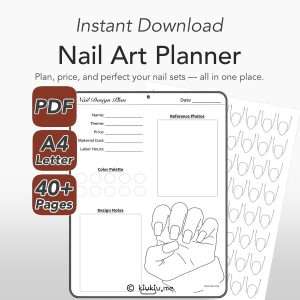
- What’s Included in the Nail Art Planner PDF
- Nail Design Planner Pages
- Nail Design Planner Fields
- Theme and Color Palette
- Reference Photos and Design Notes
- Price, Cost, and Time
- Nail Swatch Sheet Pages
- Portrait vs Landscape
- How I Use the Planner
- Who This Nail Art Planner Is For
- Quick Tips for Print and Digital Use
- How to Get the Template
- Nail Art Planner FAQ
- Nail Art Planner for Better Set Planning
Why I Made This Nail Art Planner
I made this Nail Art Planner to keep design ideas, swatches, and notes in one place—so I can actually reuse them.
Five-Finger Balance
Coming up with one cute accent nail is easy. Designing a full set that looks balanced across all five fingers is the hard part. Placement changes everything—where the focal nail sits, how heavy the design feels across the hand, and how the set reads as a whole.
At first, I used five simple nail shapes lined up on a page. It was fine for a quick idea, but it didn’t help me judge harmony. The turning point was switching to a real hand outline. When you see the set on a hand, balance becomes obvious. You can tell if the design looks too busy, if the focal point lands awkwardly, or if a particular shape and length combination makes the hand look shorter than you wanted.
Short vs Long Planning
The same design can feel totally different depending on nail length. That’s why each shape comes in Short and Long versions. It’s not about “more pages.” It’s about accuracy—planning a set that looks right at the length you actually wear or sell.
What’s Included in the Nail Art Planner PDF
This planner combines a nail design planner with dedicated nail swatch sheet pages, so you can plan the set and test the palette in one consistent system.
Pages and Layouts
- Total pages: 42
- Nail design planner pages: 28
- Nail swatch sheet pages: 14
- Layouts included: Portrait and Landscape
Both layouts include the same shapes and structure. The only difference is orientation and swatch grid layout—so you can choose what fits your workflow.
Nail Shapes
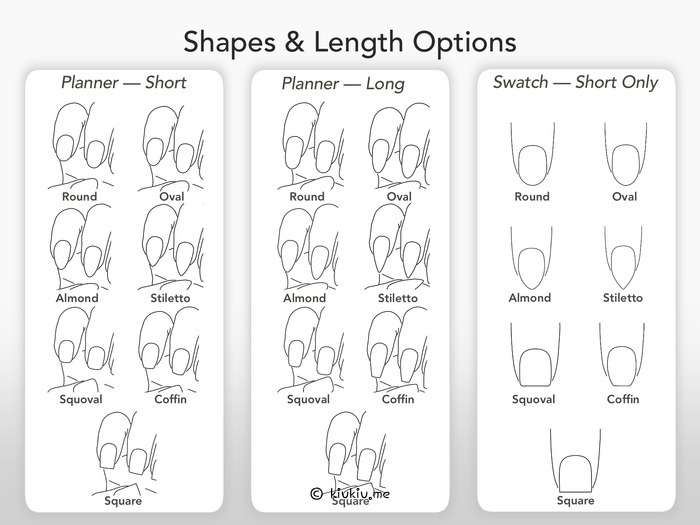
You get 7 nail shapes, each in Short and Long:
- Oval
- Round
- Square
- Squoval
- Stiletto
- Coffin
- Almond
Nail Design Planner Pages
The goal of these pages is simple: make it easy to plan sets that you can recreate later—whether you’re a hobbyist organizing ideas or a professional tracking details for repeat clients and listings.
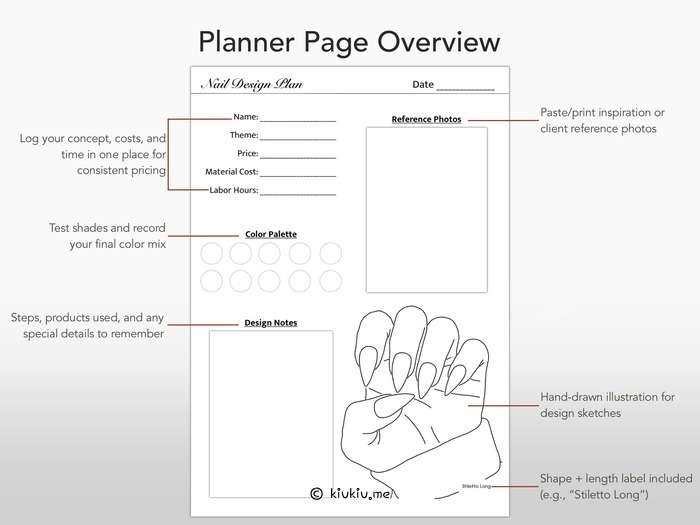
Nail Design Planner Fields
Each design page includes:
- Name
- Theme
- Price
- Material Cost
- Labor Hours
- Color Palette
- Reference Photos
- Design Notes
Theme and Color Palette
I like having a Theme section because it keeps the set cohesive. Even if you change the final details, the theme anchors your decisions. The Color Palette section does the same thing for color—especially when you’re trying to avoid “one more shade” that throws the whole set off.
Reference Photos and Design Notes
The reference area is there so inspiration doesn’t get lost in your camera roll. You can attach screenshots or photos that sparked your idea and keep them tied to the exact set you planned.
The Design Notes section is where the planner becomes practical. This is where I write the little things that matter later: what technique felt risky, what details I want to simplify next time, what kind of rhinestones I planned to use, or what I need to test before committing.
Price, Cost, and Time
If you sell press-ons or do nails for others, tracking these three fields changes everything:
- Material Cost
- Labor Hours
- Price
Even for hobbyists, writing down materials helps you notice patterns—what you use often, what you rarely touch, and whether a new purchase is actually filling a gap or just repeating something you already own.
Nail Swatch Sheet Pages
Swatching is not just for pretty charts. It’s a tool for better decisions.
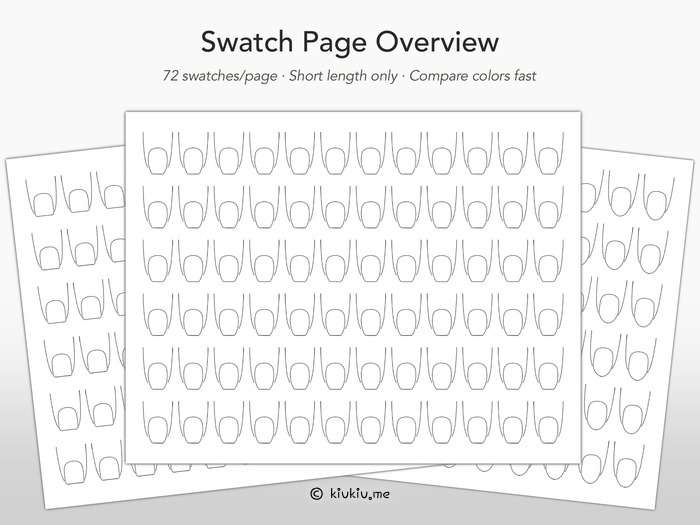
Each shape-specific nail swatch sheet page includes 72 swatch spaces, designed for testing and comparison. I didn’t create Short and Long swatch pages on purpose—swatches should stay consistent so comparing colors stays easy.
Color Comparison
A swatch layout lets you compare tones side by side—warm vs cool, sheer vs opaque, “looks similar in the bottle” shades, and seasonal palettes you want to revisit later. If you build palettes often, this saves time.
Preventing Duplicate Purchases
This is the unexpected benefit: once you start logging swatches in one system, you stop buying duplicates. You see your collection clearly. You realize you already have “that exact pink,” just in another brand or formula.
Portrait vs Landscape
I included both because people work differently.
- Landscape can feel better for printing and laying flat on a desk.
- Portrait can feel better for digital planning or storage on tablets.
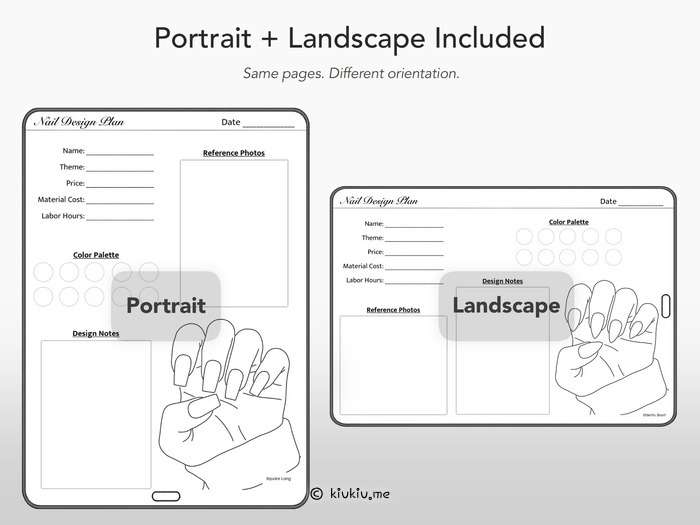
Since the content is the same, you can use either version—or both—without learning a new system.
How I Use the Planner
This is my personal flow, but the planner is built so you can adapt it.
I usually draft a design quickly, pick a palette, and build the set around balance on the hand outline. If I’m planning a special event set, I’ll often do a quick mockup first, then test the final look more realistically before committing.
I used this exact approach for a friend’s wedding nails. I drafted the direction, did a test run, and adjusted details after seeing how the shine and embellishments looked as a full set. That experience is one of the reasons I wanted a planner that supports both planning and testing in one place.
Who This Nail Art Planner Is For
- Press-on artists who want to plan sets and keep consistent records
- Nail technicians who want structured pages for pricing, timing, and reference tracking
- Hobbyists who want to organize themes, palettes, and swatches
- Anyone who wants a printable nail art template that can also be used digitally
Quick Tips for Print and Digital Use
- Print
- Sketch with markers, colored pencils, or any medium you like.
- Want to use real polish/gel? Laminate the page or slip it into a clear sheet protector first.
- Digital
- Import the PDF into your preferred app.
- If you want a clean archive, export finished pages and store them in a folder (or note app) by theme.
How to Get the Template
After purchase, you’ll download two PDFs from Etsy: README and Usage Guide.
- Download the README + Usage Guide PDFs from your Etsy purchase page.
- Open the README PDF and click the Google Drive link inside.
- Download the planner PDF files from Google Drive.
- Open the Usage Guide for quick setup tips and the mini demo video link—then start using the planner right away.
If you’re using the planner digitally, download the PDF to your device first so you can import it smoothly into your preferred app.
Shop Nail Art Planner on My Store
Nail Art Planner FAQ
Which app do you recommend most for digital use?
I’ve tried this in multiple apps, but if you want the smoothest design experience, I recommend Procreate for sketching and testing colors quickly. Once a design feels finished, I sometimes export and keep it in GoodNotes as an organized archive.
Can I use this planner as print-only or digital-only?
Yes. It works as either, or you can mix both.
Does it work for press-ons and salon sets?
Yes. The pricing, cost, and hours fields are designed to support professional workflows.
Why are swatch pages not Short and Long?
Because swatching is about consistent comparison. Keeping one swatch format makes it easier to track and compare your collection over time.
Is this a physical product?
No. This is a digital download only.
Nail Art Planner for Better Set Planning
I made this Nail Art Planner because I wanted a clean way to plan sets that actually look balanced on a hand, plus a swatch system that makes color decisions easier. If you like keeping your nail work organized—whether you’re a hobbyist or a pro—I hope this planner becomes part of your routine.
🛍 KIUKIU Store Picks & Updates
- Knitting Journal Notion Template: Your Complete Knitting Tracker
- Notion Board Game Tracker: Best Way to Organize Your Collection
- Kids Activity Planner for Parents & Teachers (Notion Template)
- Korean Alphabet Worksheets: Printable Hangul Workbook
Curious about my latest product releases? Browse all kiukiu store posts for announcements and updates.
📝 Must-Try Journaling Ideas & Inspiration
- Best 3 Hobonichi Weeks Layout Ideas for Busy Weeks
- Hobonichi Weeks vs Weeks Mega: Who Really Needs Mega?
- Hobonichi Planner for Busy Moms That Actually Works
- Morning Pages Prompts: 100-Day Journaling Challenge (Free Download)
- 2026 Planner Lineup: How I Set Up My Planners for the New Year
Want to level up your journaling practice? Explore tips, prompts, and organization ideas: Browse All Journaling Tips
Explore More in Creativity



Explore More in KIUKIU


Featured Videos: