Notion Board Game Tracker: Best Way to Organize Your Collection
 December 15, 2025
If your board game shelf is growing faster than your memory, it’s time to bring some order to it. I created this Notion board game tracker after realizing how easily I was losing track of what I owned, what I’d played, and what I actually liked. Today’s post is about why I built this template, what’s inside, and how I personally use it to organize and rediscover my favorite games.
Table of Contents
Why You Need a Board Game Tracker
When I first started collecting, it was easy to remember everything. But as my collection grew, I ran into problems I hadn’t expected. Rules I had memorized slipped away. Expansions got mixed up. Campaigns were left hanging for months. Sometimes I’d rebuy something I already owned because I forgot I had it. And when I finally had time to play, I’d spend more time choosing a game than actually playing one.
For a while, I tried writing everything in a notebook, but flipping through pages to find play counts or rule notes was exhausting. Spreadsheet versions weren’t any better—too many columns, no visual cues. I wanted something simple yet structured, where all my board game information could stay connected. That’s when Notion felt like the perfect fit.
To sum up, here’s why managing a growing board game collection gets tricky:
- Rules and expansions are easy to forget once you move on to new games.
- Long campaigns are hard to resume without clear notes.
- Tracking plays manually is time-consuming and inconsistent.
- Deciding what to play next becomes harder with too many choices.
- Collections grow faster than your memory—or your shelf space.
This is exactly what led me to build a connected, visual system in Notion to handle it all.
What’s Inside the Notion Board Game Tracker Template
This template is designed for both collectors and casual players who want everything in one place—collection info, play history, campaign progress, expansions, and even a wishlist. It’s not just a table; it’s a dashboard that helps you enjoy your hobby without feeling overwhelmed.
Dashboard Overview
Your home base. It shows your entire collection, favorite titles, top-rated games, and recent plays at a glance. You can view them as a gallery to see the cover art, or switch to a list view for quick sorting. I personally love this view because it helps me instantly spot games I haven’t touched in months.
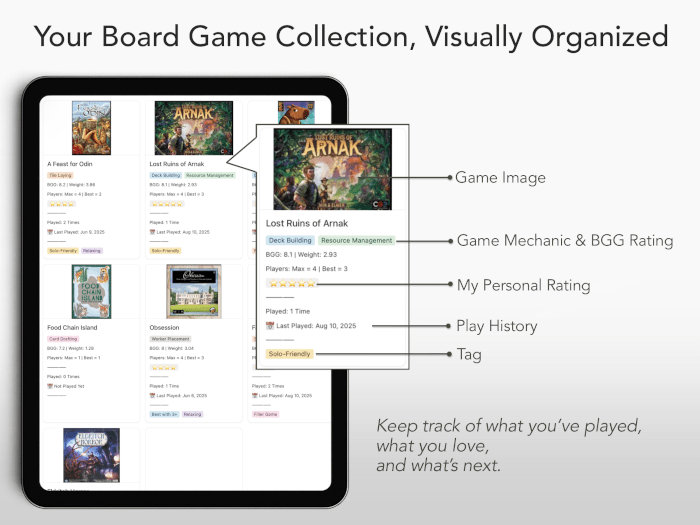
Board Game Collection Database
This section holds the heart of your collection—each game has its own page for details like play time, player count, mechanics, and personal notes. It connects automatically with your play log, expansions, and campaign tracker, so you can see everything related to one game in a single place.
Play Log
A record of your sessions. Log who you played with, when, and how it went. You can even track scores, house rules, and personal impressions. It’s also where you’ll start noticing patterns—like which games get replayed the most. I especially enjoy adding a small photo from each play; it turns the log into a visual diary.
Campaign Tracker
For campaign-style games, this tracker keeps your progress organized—what chapter you’re on, what decisions were made, and which expansions were included. It’s great for picking up where you left off, especially if your group takes long breaks. This is one of my favorite sections because it completely removed the “wait, what were we doing again?” moments.
Expansions Database
If you own games with multiple expansions, this section will keep your setup stress-free. You can link expansions directly to their base games and mark which ones were used during specific plays. It’s a small detail, but it saves me from mixing components or forgetting what worked well last time.
Wishlist & Declutter Tracker
This part helps you manage your buying and organizing habits. You can list upcoming releases, wishlist items, and potential resales all in one connected space. The tracker includes filters for “owned,” “wishlist,” and “to declutter,” making it easy to view your collection at a glance. I especially appreciate this section when I revisit my wishlist months later—sometimes I realize that excitement has faded, and it keeps me from making impulse purchases. Likewise, tracking low-rated or rarely played titles helps me make thoughtful decluttering decisions instead of emotional ones.
Extra Features
The template includes a quick-start user guide video, dark mode support, and sample data so you can get familiar with it right away. The clean layout works smoothly on mobile too, which I find especially handy for logging plays right after a session.
All these connected parts make it more than a simple board game tracker template—it’s a small digital home for your collection.
How I Use My Board Game Tracker in Notion
I didn’t just build this tracker—I use it every week. It became my way of organizing memories, not just boxes on a shelf. Here’s how I actually use each part in daily life.
Play Log: My Gaming Journal
After every session, I record the date, players, and quick impressions. Sometimes I include small notes about what worked well or what strategy I want to try next. When I play solo, I treat it almost like journaling—I’ll write how I felt about the session or attach a photo. Looking back, these notes feel like snapshots of specific moments in my life. Some are ordinary nights; others are tied to special memories with friends.
Campaign Tracker: Keeping Stories Alive
For ongoing campaign games, this tracker saves us so much time. I use it to log which expansions were used, what choices we made, and how far we got in the story. When our group reunites weeks later, I can open Notion and instantly recall everything. It’s like flipping open a saved bookmark. Because of how useful it was, my gaming group eventually started using the same template—now we all stay on the same page, literally.
Wishlist & Decluttering: Making Room for Joy
Every few months, I check my wishlist and declutter list. I look for patterns—what types of games I’m drawn to, which ones I’ve lost interest in, and whether something deserves another chance. That’s how I decided to say goodbye to Carcassonne. It was my first game and I loved it for years, but the tracker showed it had the fewest plays and lowest personal rating. I played it a few more times, said a proper goodbye, and passed it on. On the flip side, I’ve rediscovered forgotten gems—small box games I might have missed forever without this reminder.
Rediscovering Forgotten Favorites
One unexpected benefit of this tracker is how it encourages me to replay older titles. When I scroll through the dashboard and see all the covers, it’s impossible not to feel nostalgic. Sometimes I pick something purely because it’s been too long, and those rediscoveries often turn into our favorite nights. It’s a small joy, but it’s exactly what this tracker was meant to do—remind me why I fell in love with board games in the first place.
How to Get the Template
You can get the Notion board game tracker template through my store. It includes all pre-linked databases—collection, play log, campaigns, expansions, and wishlist—so you can start right away. The setup guide video walks you through the basics in a few minutes.
👉 Get the Board Game Tracker Notion Template
It’s great for casual players who want a simple way to track their games, collectors managing large libraries, solo players who enjoy journaling their plays, and anyone running multi-session campaigns. Once you start using it, the tracker becomes part of the fun itself.
Conclusion
What started as a small personal fix became one of the tools I use most often. The Notion board game tracker keeps my entire hobby organized and helps me see how my interests evolve over time. It’s not just a productivity tool—it’s a memory log for every session, friend, and game that shaped my board gaming life.
If you’ve ever wished for a cleaner way to manage your games, track plays, or remember your favorite campaigns, try setting up a Notion tracker like this. It might just help you rediscover the joy sitting on your own shelf.
🛍 KIUKIU Store Picks & Updates
- Knitting Journal Notion Template: Your Complete Knitting Tracker
- Kids Activity Planner for Parents & Teachers (Notion Template)
- Korean Alphabet Worksheets: Printable Hangul Workbook
Curious about my latest product releases? Browse all kiukiu store posts for announcements and updates.
🌟 Popular Posts
- Best Summer Knitting Top Pattern: Top Sol by MochiKnits
- How I Set Up My Traveler’s Notebooks – Passport Size
- Best Hobonichi Weeks Layout Ideas for Your Needs
- Hobonichi Weeks Mega Review: Is It Worth The Hype?
Looking for fresh inspiration, practical tips, and creative ideas? Explore my most popular posts—the articles readers loved the most!
Explore More in KIUKIU



Latest Updates:




Featured Videos: