Kids Activity Planner for Parents & Teachers (Notion Template)
 December 1, 2025
 I created this Kids Activity Planner out of both love and necessity. As a working mom, I often felt torn between work and wanting to spend meaningful time with my child. Like many parents, I once wondered whether I should send my child to an after-school program. Everyone seemed to be doing it, but my child always wanted to stay close to me — weekday afternoons, weekends, anytime.
I knew this phase wouldn’t last forever. Someday, playing with friends would become more important than being with mom. So I decided to make the most of this time — not just to play together, but to help my child’s development in ways I could manage at home.
In today’s post, I’ll share why I created this planner, how it works inside Notion, and how it helped me organize activities, track growth, and make parenting a little easier and more intentional.
Table of Contents
Why I Created This Kids Activity Planner
When I first started, I didn’t have a clear plan. I just wanted to spend time with my child doing creative things — coloring, crafts, little DIY projects. But soon, I noticed something interesting. My child became really good at coloring… but couldn’t handle scissors properly.
That’s when I realized I had been unintentionally focusing on only one area of development. Every child needs balance — fine motor skills, creativity, focus, social play, and cognitive growth. So I started researching developmental goals and tried to mix activities to cover each area.
Still, there was a big problem: preparation.
Finding ideas, preparing materials, setting up everything after work — it took so much time and energy. Eventually, I would delay activities because I was too tired or missing some supplies.
That’s when the idea for this Kids Activity Planner was born. I wanted one place to plan, log, and manage everything — including materials — without losing the joy of doing these activities together.
How the Kids Activity Planner Works (and a Quick Tour Inside)
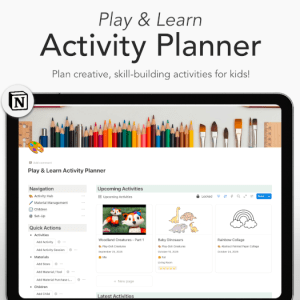
This planner is built in Notion, so you can use it on your laptop, tablet, or phone. All the databases are connected, helping you organize ideas, track development, and manage supplies seamlessly.
Here’s how each part works:
- Activity DB: Store every activity idea — from art projects to sensory play — and include details like materials, duration, and developmental focus.
- Session Log: Record each session with notes on what went well and what challenged your child. You can also rate the session and link it to the materials you used.
- Material Tracker: Keep track of your craft supplies — quantities, purchase sources, and even risk notes like “fire hazard.”
- I mark “low stock” items and, once a month, go through that list to restock from stores where I previously found the best deals. It saves so much time — no more late-night searches or last-minute craft store runs.
- Child Profiles: Each child’s page includes their interests, favorite activities, and notes on which areas of development need more focus.
- Development Goals: Categorize developmental areas so you can remember what each child needs to work on.
- Activity Categories: Tag activities (like “art,” “fine motor,” “logic,” etc.) to make sure your monthly plan stays balanced.
- Auto-Linking System: Update one entry, and all related data — sessions, materials, or profiles — are automatically reflected everywhere.
The Dashboard gives you an overview of:
- Upcoming Activities
- Materials to Restock
- Linked Child Profiles for quick access
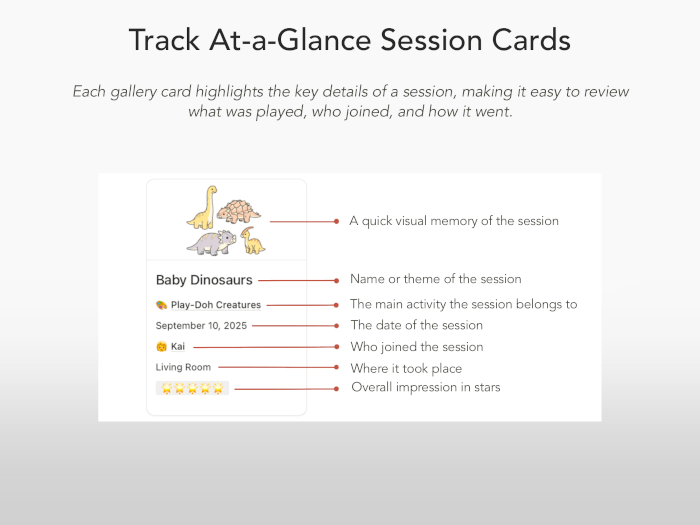
It’s minimal, easy to use, and works beautifully even on mobile. The gallery view shows session cards at a glance, so you can scroll through your past activities and feel proud of how much you’ve done together.
Key Features of This Notion Activity Planner
This planner is flexible enough to fit different lifestyles — whether you’re a parent, a teacher, or a homeschooler.
For Parents
You can easily build a balanced play routine at home without feeling overwhelmed. I usually plan two to three activities a week — not too much, but enough to keep things fun and consistent. Recording how my child reacts after each session helps me see patterns over time: what they enjoy most, what’s challenging, and how their focus has improved.
It also feels rewarding to look back at all those session logs — like a little parenting diary that reminds me how far we’ve both come.
For Teachers
Teachers can use this planner to manage group sessions or individual progress. You can record each child’s developmental notes or short reflections on the day’s activities. These logs become helpful reference materials for future lessons or parent meetings.
The Material Tracker makes class prep faster too — you can check what’s already available, what’s low in stock, and where to reorder supplies at the best price.
For Homeschooling Families
If you’re homeschooling, this planner becomes your central hub. It’s perfect for planning thematic lessons, balancing art, science, and creative play, and keeping a visible record of growth. Each activity connects to developmental goals, so you can ensure your child’s learning stays well-rounded.
For Working Moms
Time is limited, and I know that well. This planner helps me prepare faster, reuse ideas from previous sessions, and keep all notes in one place. The “low stock” system especially saves me from unnecessary stress — since I now restock everything in one go each month, I no longer waste time checking what’s missing or searching for the best price.
Benefits of Using the Planner
Since using this Notion planner, I’ve noticed a big shift — both for my child and myself.
- Balanced Development: It helped my child improve not only creativity but also fine motor and focus skills.
- Routine & Reflection: Writing quick notes after each activity built a natural rhythm and helped me see what worked best.
- Efficient Material Management: The tracker and monthly restock routine cut my preparation time dramatically.
- Better Connection: Doing these activities together strengthened our bond more than I expected.
- Less Stress: Having everything in one Notion dashboard removed the “where did I put that list?” problem once and for all.
Real Impact After 3 Months of Using It
After about three months, I noticed visible improvements. My child became more confident and curious — always asking, “What are we making today?” Even the teacher mentioned better focus during craft and study time.
But for me, the biggest change was internal. I no longer felt guilty for not doing enough. Instead, I felt organized, prepared, and more connected. These moments became my own kind of therapy — a chance to slow down and share something meaningful with my child.
Get the Kids Activity Planner
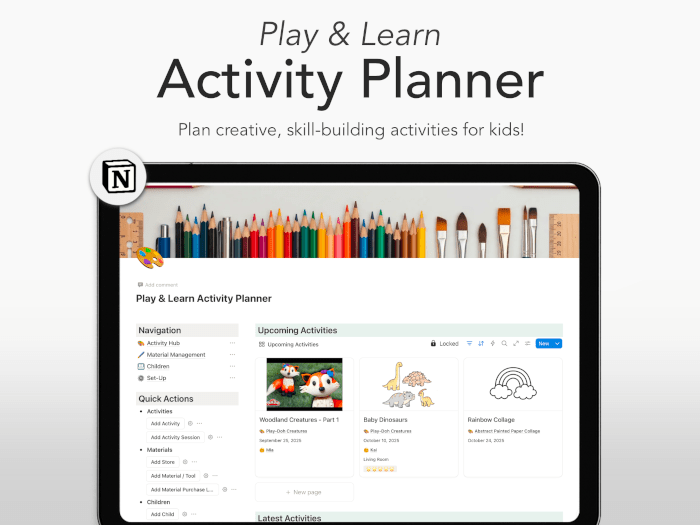
If you’d like to try it yourself, you can get the Notion Kids Activity Planner on my Etsy store.
It includes all the linked databases, sample entries, and a detailed user guide so you can quickly understand how each part works — from adding new activities to linking materials and logging sessions.
Even if you’re new to Notion, the step-by-step guide will walk you through everything, so you’ll feel comfortable using it right away.
Final Thoughts
This Kids Activity Planner isn’t just about scheduling playtime — it’s about turning those moments into growth, both for your child and for you.
It’s a simple, intentional way to bring structure to creativity and make every small session count.
For me, it’s not just a planner — it’s a record of connection, progress, and love.
If you’ve ever wished for a calmer, more organized way to nurture your child’s curiosity and development, I hope this planner gives you the same joy and balance it gave me.
🛍 KIUKIU Store Picks & Updates
- Knitting Journal Notion Template: Your Complete Knitting Tracker
- Notion Board Game Tracker: Best Way to Organize Your Collection
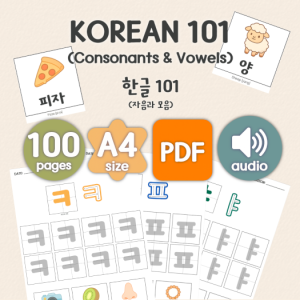
- Korean Alphabet Worksheets: Printable Hangul Workbook
Curious about my latest product releases? Browse all kiukiu store posts for announcements and updates.
📝 Blog News & Updates
- AdSense Approval Tips: SEO & Performance That Actually Work
- Google AdSense Approval: What Finally Worked for Me
Looking for my latest blog updates? Find the newest updates.
🕒 Must-Try Productivity & Time Management Tips
- Knitting Journal Notion Template: Your Complete Knitting Tracker
- Morning Pages Prompts: 100-Day Journaling Challenge (Free Download)
- Free Mandala Chart Template for Your New Year Goals
- Time Tracker for Hobonichi Weeks & A6 (Free Download)
- JLPT Study Planner with Hobonichi: Timeline and Layout Tips
Want to manage your time better and stay productive? Explore practical tips and simple time-saving strategies: Browse All Productivity Tips
Explore More in KIUKIU



Explore More in Life Plan




Explore More in Study


Featured Videos: